
Shadow AI can start with an ordinary task: rewriting an email, summarising notes or comparing supplier information in a tool the business has not approved or recorded.
Small-business leaders need visibility before they can set useful rules. Start with five questions:
- which business task is involved;
- which tool and account the person uses;
- which information goes into it;
- whether the output stays a draft or triggers an action;
- who checks the result and owns the use.
Once you understand the use, set an approved route and apply task-level controls such as input, output and review boundaries.
AI Use Has Outpaced Rules
AI adoption has moved faster than formal operating rules in many organisations.
Microsoft and LinkedIn's 2024 Work Trend Index surveyed 31,000 people across 31 countries. It reported that 75% of global knowledge workers used AI at work and 78% of AI users brought their own AI tools to work. The figure reached 80% among AI users in small and medium-sized companies.
Those figures describe a global 2024 survey, not current UK prevalence. They still show why leaders should ask about current use rather than wait for an incident or procurement request.
Staff may use AI to reduce admin, speed up drafting or understand information. Without an approved route, each person makes separate choices about tools, accounts, data and review.
Shadow AI Without the Scare Language
- a manager pasting meeting notes into a public AI tool;
- a sales person asking AI to rewrite a client email;
- an administrator summarising a policy document;
- a project lead asking AI to compare supplier options;
- a team member using a personal account because the business has not provided guidance.
Five Questions That Make Current Use Visible
Ask one person about one real task. Record the shape of the use, not the underlying confidential information.
1. Which business task?
Name the job in plain language, such as drafting a follow-up email from approved notes or summarising public research. Broad labels such as marketing or admin hide the risk and make review harder.
2. Which tool and account?
Record the product and whether the person uses a personal, free, business-managed or API account. Product names alone do not tell you which settings, contractual terms or administrative controls apply.
3. Which information?
Classify the input as public, internal non-sensitive, personal, client confidential or commercially sensitive. Record the class. Do not copy the information into the register.
4. Which output or action?
A draft that a person checks carries a different level of risk from a tool that sends a message, creates a record, writes a file or triggers another system.
5. Which human owner?
Name the person who checks the output, approves any action and reviews whether the use should continue. If nobody owns it, stop and assign an owner before expanding the use.
The Shadow AI Starter Register provides a copyable table for these five questions.
Choose the Next Control
Place each use into one of three groups:
- continue within an approved route;
- review the tool, data, permission or supplier terms before further use;
- stop pending review because the use involves sensitive information, credentials, unapproved system access or action without human approval.
The UK government's 2025 AI Cyber Security Code of Practice supports this direction. It calls for awareness, human responsibility, asset tracking, protection of sensitive data and accessible guidance for end users. The code covers organisations that use third-party AI components as well as organisations that build AI systems.
An SME does not need to reproduce the full code in a staff checklist. It does need to know which AI uses exist, who owns them and where technical or professional review is required.
Safer Instructions Are One Task-Level Control
A safer instruction helps after you have confirmed that the task, tool, account and information are suitable. It cannot approve a supplier, change retention settings, enforce access controls or discover other AI use across the team.
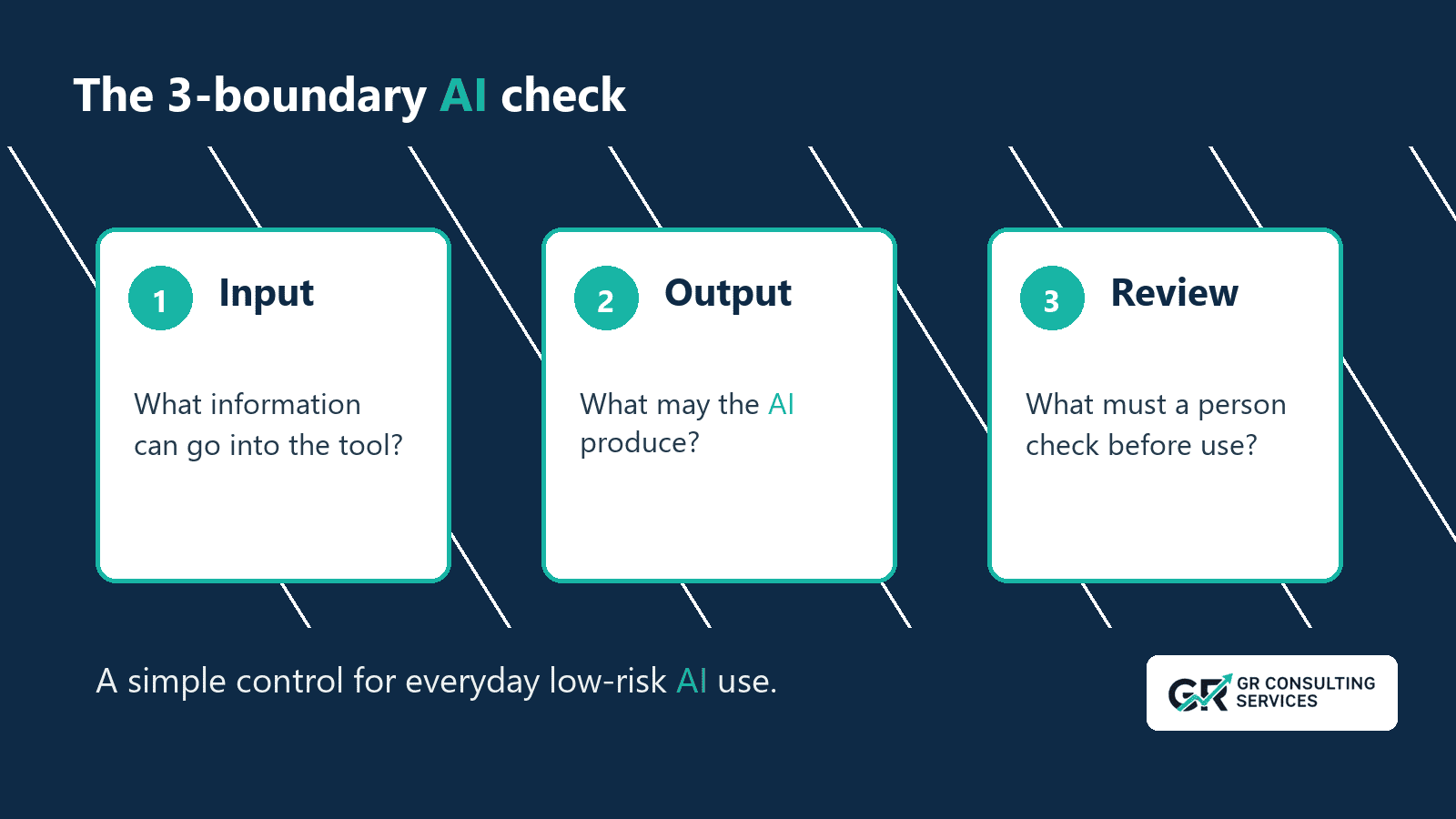
For an approved low-risk task, define three boundaries.
A safer AI instruction should define three boundaries.
1. Input Boundary
The input boundary answers:
| What information may go into this tool for this task?
Examples:
- approved meeting notes;
- anonymised examples;
- public information;
- short non-sensitive excerpts;
- internal material approved for the chosen tool.
The boundary should also exclude material that lacks the right policy, permission or tool setting:
- client confidential material;
- personal data;
- HR issues;
- legal or financial matters;
- passwords, keys or credentials;
- full transcripts where an excerpt would be enough.
The input boundary matters because AI tools are not all used, configured or governed in the same way. A task that is suitable in one approved environment may be unsuitable in a personal account or unreviewed public tool.
Consultants, agencies and fractional leaders need one further rule: information approved for one client must not shape work for another. Keep each client's material inside its approved task, tool and workspace.
2. Output Boundary
The output boundary answers:
The output boundary answers:
| What is the AI allowed to produce?
Useful outputs include:
- a draft;
- a summary;
- a comparison;
- a list of questions;
- a first-pass checklist;
- options for a person to consider.
Riskier outputs include:
- a final decision;
- an instruction to another person;
- a commitment to a client;
- legal, financial or HR advice treated as authoritative;
- anything that updates a business record automatically;
- material sent without review.
For everyday SME use, the safer default is simple:
| AI may draft, summarise, compare and suggest. A person decides, approves, sends and records.
That distinction keeps the tool useful without pretending it has business authority.
3. Review Boundary
The review boundary answers:
| What must a person check before using the output?
For most business tasks, review should include:
- facts;
- names;
- dates;
- commitments;
- tone;
- source support;
- confidentiality;
- missing context;
- whether the output changes the meaning of the source material.
Client-facing wording needs close review. A confident AI draft can introduce a promise, deadline, interpretation or recommendation that the business has not agreed.
The instruction should make review visible:
| End with a checklist of what I should verify before using this output.
That small line changes the shape of the work. It makes the AI output easier to inspect rather than harder to challenge.
The review boundary answers:
| What must a person check before using the output?
For most business tasks, review should include:
- facts;
- names;
- dates;
- commitments;
- tone;
- source support;
- confidentiality;
- missing context;
- whether the output changes the meaning of the source material.
Client-facing wording needs close review. A confident AI draft can introduce a promise, deadline, interpretation or recommendation that the business has not agreed.
The instruction should make review visible:
| End with a checklist of what I should verify before using this output.
That small line changes the shape of the work. It makes the AI output easier to inspect rather than harder to challenge.
A Weak Prompt Rewritten
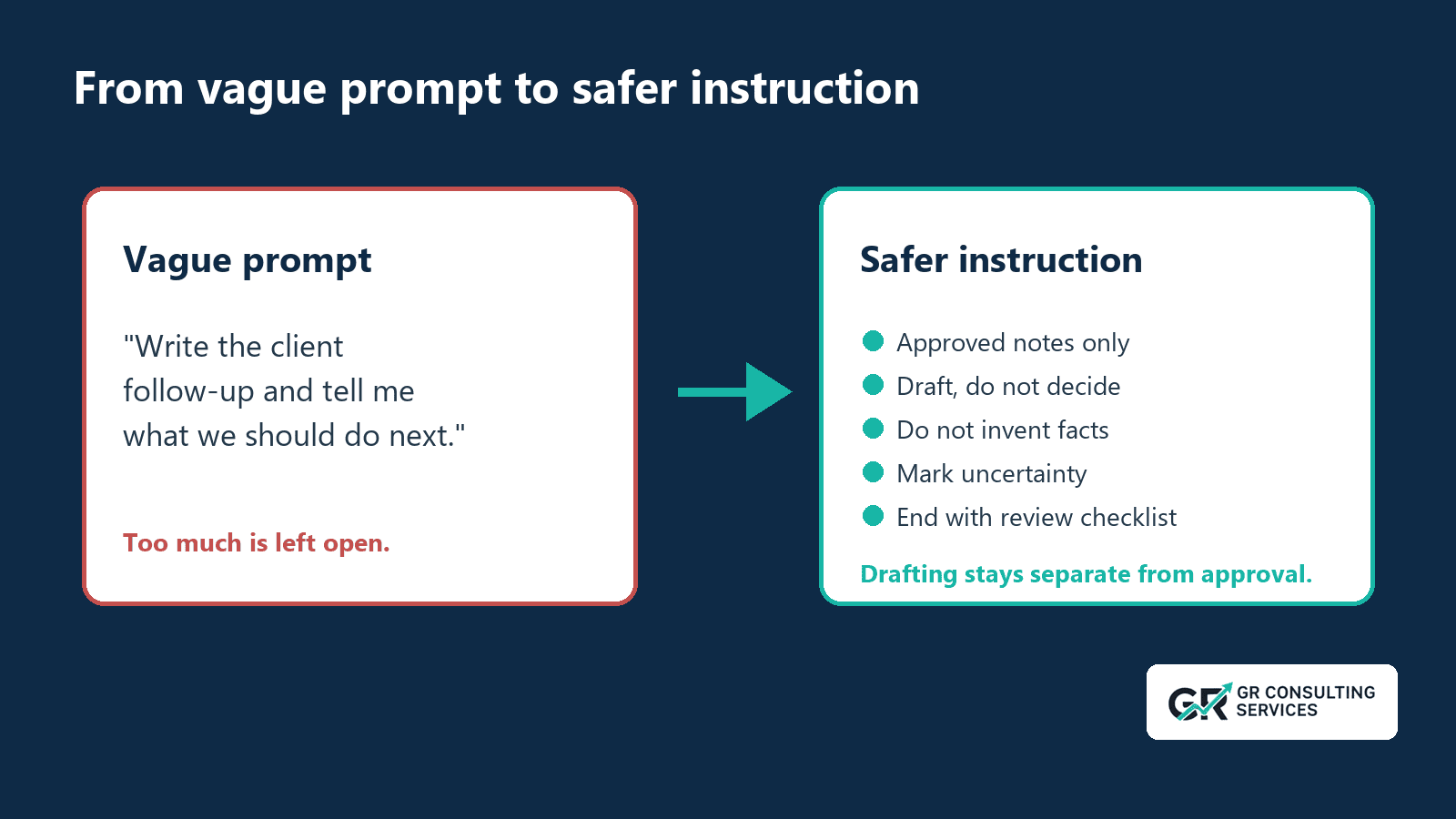
| Use this transcript to write the client follow-up and tell me what we should do next.
Problems with the weak version:
- it does not say whether the transcript is suitable for the tool;
- it allows the AI to infer next steps;
- it does not separate drafting from deciding;
- it does not say how to handle missing owners, dates or decisions;
- it does not require human review before sending.
Safer instruction:
Use this approved, non-sensitive meeting excerpt to draft a follow-up email. Do not invent decisions, owners or dates. Mark anything unclear as needs review. Do not decide next steps. Do not write as though the email has been approved. End with a checklist of items I should verify before sending.
The revised instruction narrows the task, reduces guesswork and includes review in the output. A full policy still needs wider controls.
The Safer Prompt Pattern
Use this pattern for everyday low-risk tasks:
You are helping with one narrow business task: [task].Use only the information I provide in this chat.Input boundary:- Do not ask for confidential, personal, legal, HR, financial or client-sensitive information.- If the task needs that information, say what is missing instead of guessing.Output required:- [section 1]- [section 2]- [section 3]Uncertainty rules:- If a name, date, owner, decision or source is unclear, mark it as "not stated" or "needs review".- Do not invent facts, commitments, quotes or approvals.Boundary:- Do not make a final decision.- Do not write as though anything has been approved.- Do not suggest sending, storing or updating anything without human review.Review:- End with a short checklist of what a person should verify before using the output.
This pattern works best when the task is narrow and the source material is appropriate for the chosen tool.
Sensitive legal, HR, financial, medical, security or confidential client decisions need stronger rules and, often, professional advice.
Wider Controls Still Needed
Safer instructions provide an early control within a wider AI operating model.
They do not solve:
- tool procurement;
- data protection assessments;
- client confidentiality obligations;
- access control;
- retention settings;
- audit trails;
- AI output monitoring;
- approval routing;
- training;
- incident handling.
A prompt can request review, but it cannot enforce permissions. When a system can retrieve records, write files, update software or send messages, configure access controls, audit logs and approval gates outside the prompt.
Many AI problems in SMEs begin when people face work pressure, have useful tools and lack a shared rule for acceptable use.
Where Prompt Injection Fits
Prompt injection is a separate but related risk.
Prompt injection uses instructions embedded in content to manipulate an AI system. The risk increases when a tool can browse websites, access records or trigger actions.
The UK NCSC has warned organisations to use caution when building services on large language models whose outputs can influence actions or access external data.
Require a defined review point before AI output drives a business action involving external content, sensitive data or system access.
This week's pattern limits AI to drafts, summaries and checklists, with a person reviewing the result.
A 60-Second Team Check
Before using AI for a task, ask:
- Is this the right tool for the information involved?
- Is the task narrow enough to check?
- Have we removed unnecessary sensitive detail?
- Does the instruction say what the AI must not do?
- Does a named person approve any decision, message, stored record or system update?
If any answer is unclear, pause.
A short pause helps the business contain risk while staff experiment with useful tools.
Actions for This Week
Start with a short team conversation.
Ask the team:
- Where are you already using AI to save time?
- Which tasks feel useful and low risk?
- Which information should never be pasted into a public or personal tool?
- Which client information must remain separate?
- Which outputs must always be reviewed before use?
- Where would a saved instruction help us work more consistently?
Record each use in the Shadow AI Starter Register. Capture the task, tool and account, information class, output or action, human owner and next control. Do not copy the underlying business information into the register.
Then choose one approved low-risk use case and write the safer instruction together.
- rewriting internal notes;
- summarising public research;
- turning approved notes into a draft agenda;
- creating a checklist from a non-sensitive process;
- preparing first-draft wording for internal review.
Avoid starting with:
- confidential client transcripts;
- HR matters;
- legal disputes;
- financial advice;
- sensitive commercial negotiations;
- anything involving credentials or private account access.
The Sensible Next Step
If AI use is already happening, give people a safer default.
Start with:
- one narrow task;
- one approved tool or route;
- one input boundary;
- one output boundary;
- one review rule.
These controls establish a usable starting point for AI governance.
GR Consulting Services helps founder-led SMEs turn informal AI experimentation into practical operating habits: clear use cases, safer instructions, better context, human review and sensible workflow design.
Find one useful AI opportunity and the controls it needs.
Shadow AI Starter Register and Safer AI Instruction Card. If you want help deciding where AI can save time without creating avoidable risk, book an opportunity call with GR Consulting Services. We will discuss one real business task, the information involved and a practical next step.