

Workspace Memory: The Context Your AI System Needs and the Data It Does Not

07 Aug 2026 10:05 AM Comment(s) By GR Consulting Services

An AI tool can produce a polished answer from the wrong service description, an old price or a note that nobody approved.

The model may have followed the request but used weak business context.

Small teams often solve the problem by pasting more material into the chat. That approach spreads copies, hides the source and makes review harder. A maintained workspace gives the task a smaller, controlled set of context.

This guide uses workspace memory as an operating term. It means approved business context that people maintain for defined AI tasks. It does not refer to one provider's memory feature, and it does not remove the need for human review.

What We Learned From Our Own Workspace

As we expanded our internal AI workspace, one practical problem became harder to ignore. Improving one area did not update every related file, instruction or summary. Material that was once accurate could remain in place after the source changed.

The problem was not limited to storage. Each new task added another set of relationships to maintain: source material, working instructions, approved records, project notes and summaries used elsewhere. A tidy structure could still contain conflicting versions.

This is a GR Consulting Services observation from our own work. One internal case cannot show how often the same problem occurs across SMEs. Current guidance supports the underlying disciplines. The UK Government's data asset management policy calls for named ownership and a mechanism for managing data quality. NIST treats AI risk management as lifecycle work rather than a one-off implementation step. GOV.UK data asset management policy and NIST AI RMF 1.0

Our response was to reduce the first scope. Prove one project or repeated task before you connect more of the business.

Run the Five-Part Context Check

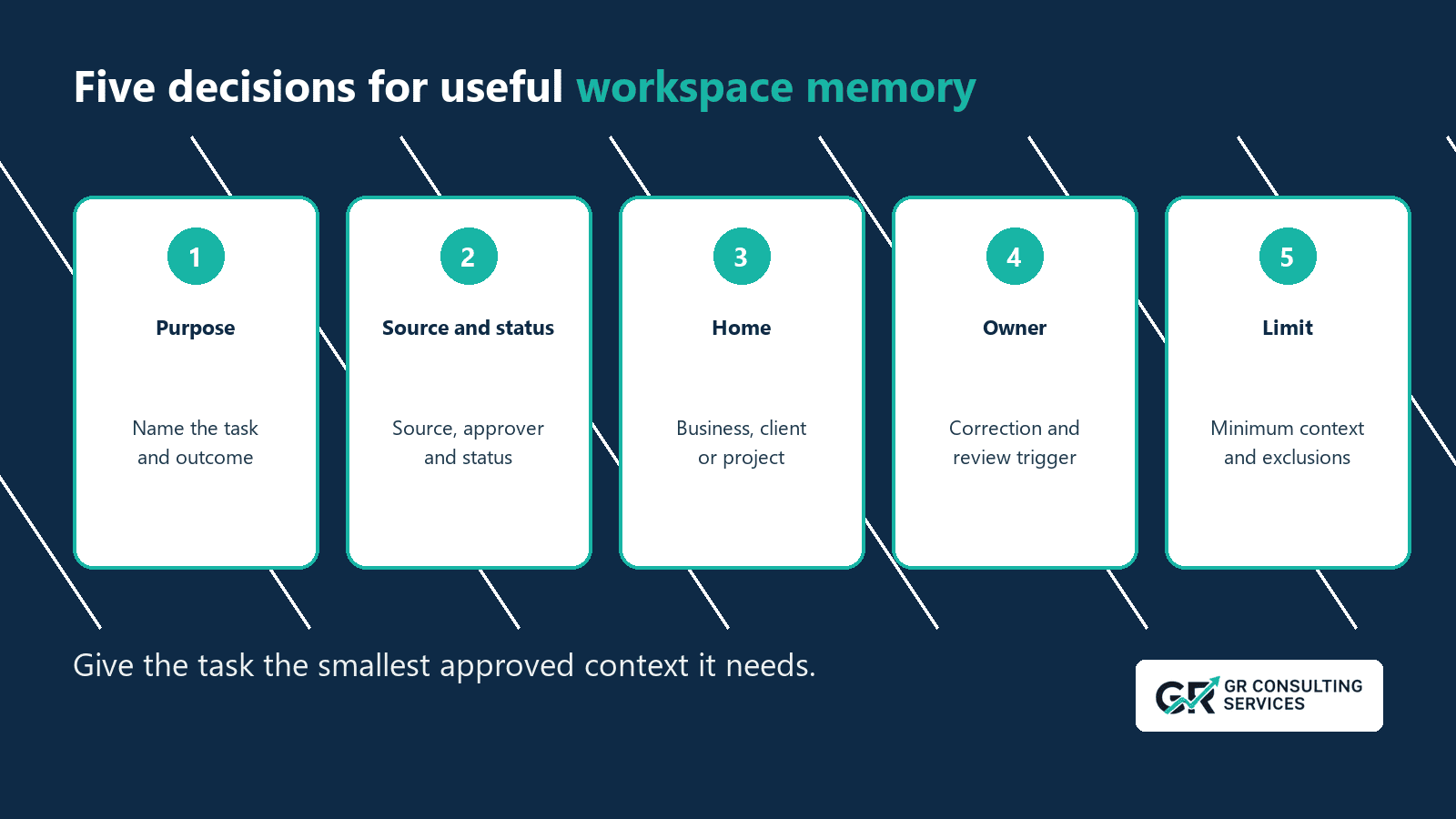
Before you expand, answer five questions:
  1. Purpose: Which task or project does this information support?
  2. Source and status: Where did the information come from, and is it draft, approved or historical?
  3. Home: Does it belong in the business, client or project workspace, and who may access it?
  4. Owner: Who corrects it, and which date or event triggers review?
  5. Limit: What should stay out, and how will the owner retire the record when it becomes stale?

Apply the check to a small set of records. Keep the business, client and project boundaries described below. The check combines provenance, access, maintenance and data minimisation; human review still determines whether the source and output are fit for purpose.

Define the Records Before Choosing a Tool

Four record types often sit close together:

Record type PurposeExampleControl
 SourcePreserves evidence or originSigned proposal, approved web page, meeting recordKeep provenance and access clear
Workspace memorySupplies maintained context across tasksCurrent service description, tone rule, approved client factAdd status, owner and review trigger
Task recordTracks work and commitmentsOwner, due date, status, next actionUpdate through the task process
 ChatHolds working conversationDraft questions, temporary analysis, alternative wordingDo not treat it as the business record

The distinctions protect the audit trail. A raw transcript can support a decision record. A person reviews the decision, approves the record and updates the right workspace. The chat remains a working area.
Give Memory a Defined Job

A memory set should support a named task.

Take a proposal draft. The task may need:
the current service scope and exclusions;
approved proof points;
the client's stated need;
brand tone and output rules.

It does not need payroll records, another client's history or a folder of old proposals. A defined job gives the team a reason to include each record and a reason to reject the rest.

This discipline supports the ICO's data-minimisation principle when the material contains personal data. The ICO tells organisations to identify the minimum amount they need for the stated purpose and hold no more. The ICO notes that this guidance is under review following the Data (Use and Access) Act, so organisations should confirm the current position when implementing controls. ICO data minimisation guidance

Use the Five-Part Context Check

1. Purpose


Name the task that will use the context and the outcome it should support.

Use in all AI work gives no useful boundary. Use to draft first-pass service proposals for human review gives the owner a test. The owner can decide whether each field supports that job.

Write the purpose beside the memory set. Reassess the set if the task changes.

2. Source and status


Record where the information came from, who approved it and what status it carries.

Use plain status labels:
Draft: work in progress; do not present as an approved fact.
Approved: the named owner has confirmed use for the stated purpose.
Historical: preserve for reference; do not use as current context.

Separate fact from opinion. Name the source of an opinion where it affects the record. The ICO accuracy guidance tells organisations to make the source and status of personal data clear and consider whether the purpose requires an update. ICO accuracy guidance

A clear source and status also improve review outside personal-data cases. A colleague can check a service claim against the approved page instead of trusting text copied from an old chat.

3. Home


Choose the narrowest suitable home:
  • business-wide workspace for company facts, brand rules and shared services;
  • client workspace for approved client context;
  • project workspace for scope, decisions and current delivery records;
  • source area for evidence that supports the maintained record;
  • archive for superseded material that the business must keep.

Access should follow the home. A user who needs brand rules may have no reason to open employee or client records.

Client separation protects trust and output quality. Similar industries, services or names do not justify a shared pool of client context.

Keep Portfolio Visibility Without Mixing Client Truth

A consultancy or multi-brand business may still need a root view across its work. That view can reveal a shared supplier, a repeated bottleneck or two datasets worth comparing.

Keep the source boundary intact:
  • label each point with its client or business unit;
  • retain the source, source date and data period;
  • check that units, definitions and methods match before comparing figures;
  • mark the result as an observed fact, inference or unresolved question;
  • keep the comparison outside the individual client records.

A connection supports investigation. It does not transfer truth. If one client reports a sales constraint, the system cannot assume another client has the same constraint. The second client needs its own evidence.

This gives an authorised team a useful portfolio view while keeping each client's maintained context separate.

4. Owner


Name a person who can approve, correct and retire the record.

Add one review trigger:
  • a date, such as the first working day of each quarter; or
  • an event, such as a price, policy, service or contract change.

Use a date for context that ages in a predictable way. Use an event for context tied to a business decision. Some records need both.

The owner should resolve conflicts. Two live service descriptions should not compete for the same task. Keep one approved version and mark the older record as historical or superseded.

5. Limit


Keep the smallest record that supports the purpose.

Exclude:
  • passwords, authentication tokens and payment-card details;
  • unnecessary personal data;
  • unsupported claims and unmarked opinions;
  • confidential client information outside the approved client workspace;
  • duplicated source material with no retention need.

Set a human boundary as well. Memory may hold an agreed communication preference or service scope. A person should handle sensitive relationship judgements, exceptions and commitments that require authority.

The ICO says organisations must justify how long they retain personal data, review it and erase or anonymise information they no longer need. ICO storage-limitation guidance
Five-part workspace-memory check covering purpose, source and status, home, owner and limit.

Use a Small, Legible Structure

A small business can start with a structure that staff can inspect:


Business workspace
  Brand and tone
  Services
  Current priorities
  Operating rules
  Approved sources

Client workspaces
  Client A
    Approved context
    Project records
    Sources

  Client B
    Approved context
    Project records
    Sources

Archive
  Superseded records
  Retained source material


The structure matters less than the decisions behind it. Staff should know which home to use, who owns the record and how to find its source.

Avoid a folder that receives every note. A mixed holding area needs a review queue and an owner. Nothing should enter approved memory because somebody saved it near the right files.

Move Context Through a Review Route

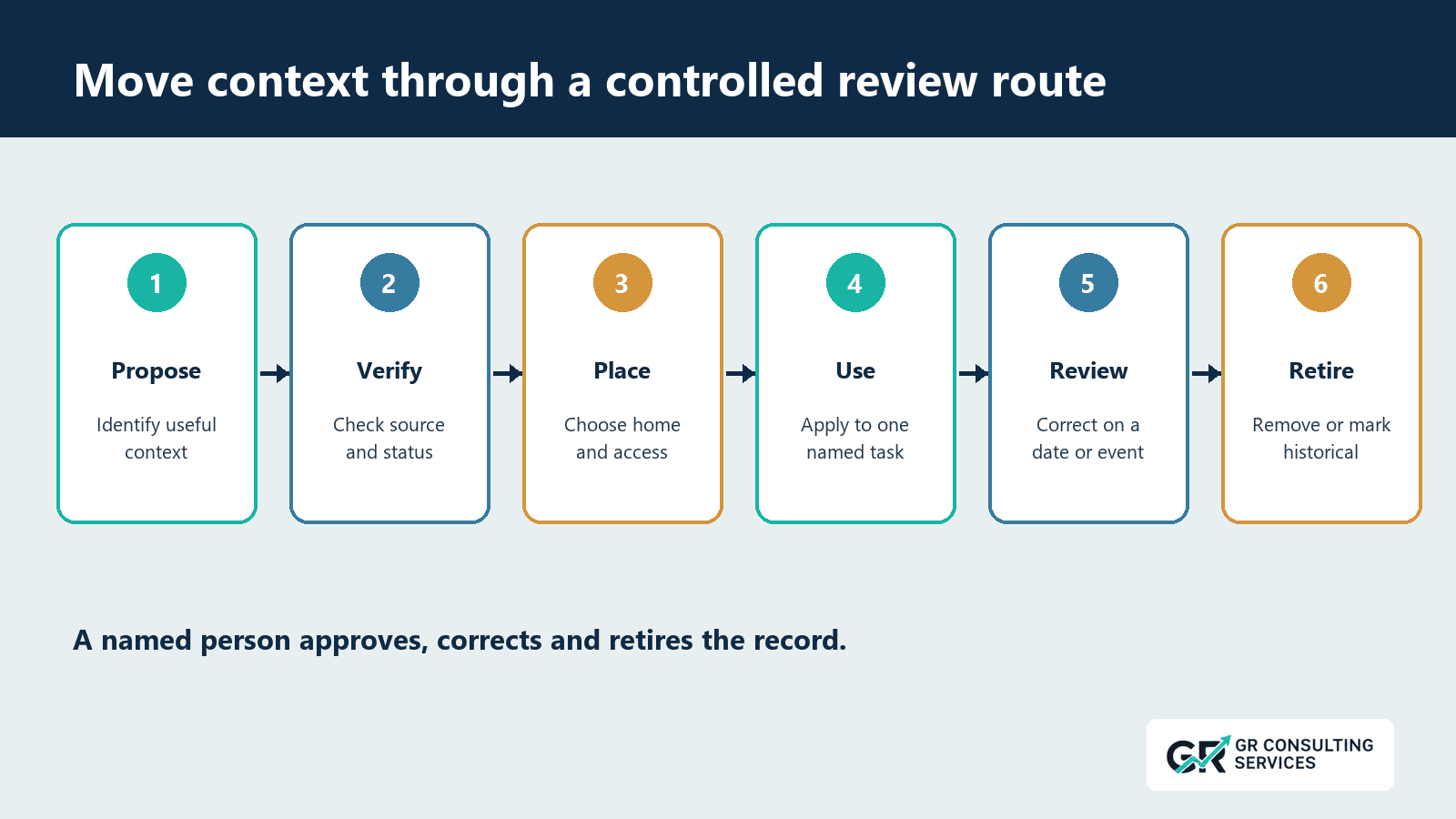
Use six stages: propose, verify, place, use, review and retire.

1. Propose
    A colleague identifies a fact or rule that a repeated task needs.

2. Verify
    The owner checks the source, status, purpose and sensitivity.

3. Place
    The owner selects the business, client or project home and sets access.

4. Use
    The task receives the approved context and a person reviews the output.

5. Review
    The owner checks the record on the set date or event.

6. Retire
    The owner removes, archives or marks the context as historical under the retention rule.

The ICO's accountability principle requires organisations to take responsibility and keep suitable measures and records when the workspace holds personal data. A visible owner and review route support that duty. ICO accountability guidance
Six-step controlled review route for context: propose, verify, place, use, review and retire.

Test One Memory Set

Choose a low-risk, repeated task such as drafting a standard service introduction.
  1. Write the expected result and review rule.
  2. Select five to ten approved context records.
  3. Apply purpose, source and status, home, owner and limit to each record.
  4. Run five known examples, including one outdated source and one client-separation test.
  5. Ask a reviewer to trace each material claim and correct the maintained record.

Record five measures:
MeasureTest
Context accuracyDid the output use current approved facts?
TraceabilityCould the reviewer locate the source for each material claim?
SeparationDid the task avoid other clients and unrelated business records?
Review effortHow many minutes did correction take?
RetirementCould the owner remove or mark stale context in one place?

Stop the pilot if the team cannot explain access, source status or correction. Adding more records will spread the defect.

Common Failure Points

Treating Chat History as the Record


Chat history can preserve useful working context, but it does not replace an approved business record. Copy the confirmed outcome into the maintained home and keep the source reference.

Adding Every Document


Large document sets increase stale and irrelevant context. Include records because the named task needs them.

Mixing Draft and Approved Material


A polished draft can look authoritative. Give each record a visible status and stop draft material from entering tasks that require approved facts.

Mixing Clients


Place each client's context inside its approved workspace. Test the boundary with similar names and services before use

Assigning No Owner


A review date without an owner creates an unattended reminder. Name the person who has authority to correct or retire the record.

Automating Personal Judgement


Context can support a person without replacing their authority. Keep complaints, sensitive negotiations and relationship decisions under human control.

Keeping Superseded Copies


Mark the current record and remove or archive duplicates under the retention rule. Search results should not give an old record equal status.

A Practical Starting Point

Pick one repeated task that already relies on copied context.

Create a small approved set. Give each record a purpose, source, status, home, owner, update trigger and retirement rule. Remove material the task does not need. Test known examples and one boundary case.

Expand only after the team proves that it can maintain the review route. The first goal is a context set that people can trace, correct, separate and retire without searching duplicate folders or old chats.

Give one AI task accurate business information that your team can maintain.

Run the five-part check on one repeated, low-risk task. If stale facts, unclear ownership or mixed client information keeps weakening the result, book an opportunity call with GR Consulting Services. We will examine the task and define a manageable source and review process.


GR Consulting Services

https://www.gr-consulting.co.uk/