

From Repeated Prompt to Reusable AI Assistant

03 Jul 2026 08:19 AM Comment(s) By GR Consulting Services

If a prompt is useful more than once, the next step is usually not a complex automation project. It is a reusable assistant with clear instructions, boundaries and a human review point.

For a founder-led SME, that can be a practical middle ground: more consistent than rewriting the same prompt each week, but simpler and safer than connecting AI into every system around the task.

Start with the Repeated Job
In the first week of this series, we started with one useful task: use an approved meeting transcript to produce a summary, decisions, action items, open questions and a draft follow-up email.

In the second week, we looked at the wider workflow around that answer: review, filing, task updates, record-keeping and follow-up.

This week sits between those two points.

Before you connect the whole workflow, ask whether the useful prompt has become a repeated job.

If it has, stop relying on memory.

A reusable assistant should make the method easy to run again, without turning it into an uncontrolled system.

What a Reusable Assistant Actually Is

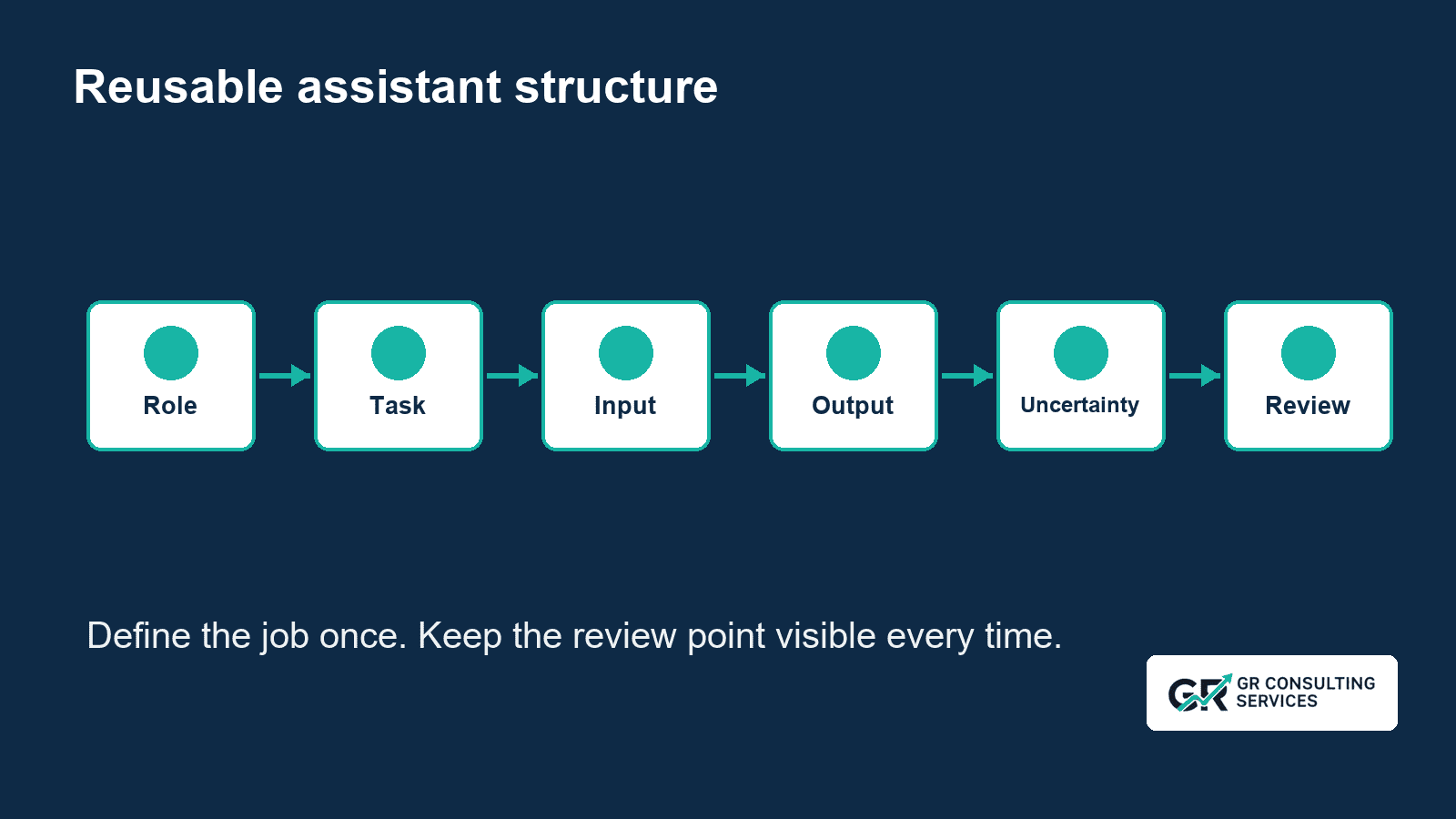
A reusable assistant is a maintained instruction set for a repeated task.

Depending on the tool, it might be called a Gem, skill, Project, Space, saved prompt or custom instruction. The product labels differ, but the design problem is similar:

  • define the role;
  • define the task;
  • define the input;
  • define the output format;
  • define what to do with uncertainty;
  • define the boundaries;
  • define the human review point.

The aim is not to make the assistant sound clever.


The aim is to make the useful method easier to repeat and easier to check.


Keep the Method Separate from Maintained Context

A reusable assistant preserves how you want a task completed. Workspace memory supplies approved, current context about the business.


Treat these as separate layers. Mixing them too early can introduce stale, excessive or misplaced information, especially when your team works across several clients.


Prove the method first. Then decide which maintained context the task needs, who owns it and how your team will keep client information separate.

A six-part assistant structure showing role, task, input, output format, uncertainty rules and review point.

The Meeting Follow-Up Example

For the meeting follow-up task, a Lite assistant should have a narrow job.


It may help turn an approved transcript into:

  1. A concise meeting summary.
  2. Decisions made.
  3. Action items with owner and due date, where stated.
  4. Open questions or unresolved points.
  5. A short draft follow-up email.

It should also make the review rules obvious:

  • do not invent missing facts;
  • write  not stated  where the transcript does not provide an owner or date;
  • flag unclear names, dates or commitments;
  • distinguish confirmed decisions from ideas under discussion;
  • keep the follow-up email as a draft until a person approves it.

That is enough to make the task more consistent.


It is not enough to make it a complete business workflow.


What the Lite Assistant Must Not Do

The boundary matters.


The public  Meeting Follow-Up Assistant Lite  should not:

  • write into workspace memory;
  • update task files;
  • identify recipients automatically;
  • create or send emails;
  • alter project or client records;
  • run without human review;
  • process confidential or personal material unless the organisation's policies, permissions and tool terms allow it.

Those are different problems.


They may be worth solving later, but they need stronger context, permissions, testing, routing and approval rules than a simple reusable assistant should promise.


Basic Prompt versus Reusable Assistant versus Connected Workflow


Stage
Basic promptReusable assistantConnected workflow
InstructionsRewritten or pasted each timeSaved and reusedMaintained as part of the operating workflow
Output formatDepends on the promptStandard sectionsStandard sections plus downstream handling
Missing informationOften inconsistentClear uncertainty rulesValidation and exception handling
Human reviewDepends on the userBuilt into the instructionNamed approval point
Task updatesManualManualPrepared or applied under defined controls
RecordsManualManualRouted to the correct controlled place
Best useOccasional low-risk taskRepeated drafting taskFrequent process with wider handling

The reusable assistant is not better because it is more advanced.


It is better when the repeated task needs consistency.
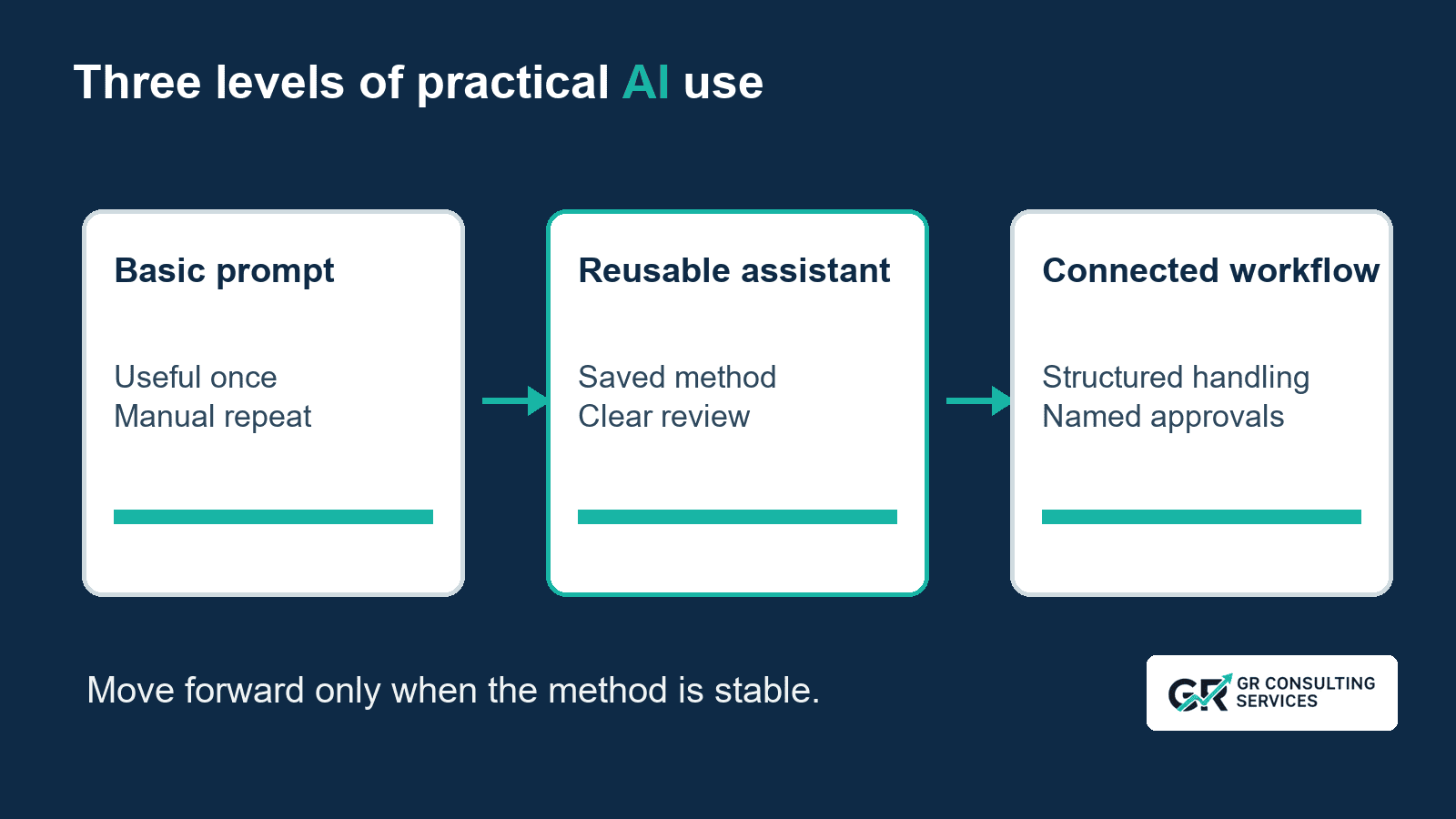
A comparison showing a basic prompt, a reusable assistant and a connected workflow, with the assistant improving consistency but not taking autonomous action.

One Method, Several Tools

The same method can be adapted to different tools, but the setup should be checked against current product guidance before publication or rollout.

At the time of preparing this pack:

  • Google describes custom Gems as reusable Gemini instructions built around goals, desired behaviours and format, with guidance to think in terms of persona, task, context and format.
  • Claude Projects can be used as a place to keep project-specific chats, knowledge and instructions where available on the relevant plan.
  • Perplexity Spaces are generally better treated as research-oriented spaces rather than a universal workflow engine.
  • Codex skills are useful where repeatable instructions need to operate around local files and workspace behaviour, but they are not the right public default for every non-technical business user.
  • A saved prompt in a trusted note or internal prompt library may be sufficient for many SMEs.

The important point is not the label.


The important point is that the assistant has a clear job and a clear review boundary.


How to Build the First Version

Use this simple sequence:

  1. Choose one repeated task.
  2. Write the task in plain English.
  3. Define the input the assistant needs.
  4. Specify the output sections.
  5. Add uncertainty rules.
  6. Add hard boundaries.
  7. Add the human review checklist.
  8. Test on one low-risk example.
  9. Adjust the instruction before wider use.

For meeting follow-up, the first test should use a short, low-risk internal transcript that is appropriate for the chosen tool.


Do not start with a confidential client meeting, a HR issue, a legal dispute or anything where an error would carry significant consequence.


What to Check in the Output

Review the assistant's first few outputs against the transcript.


Check:

  • Are decisions separated from discussion?
  • Are owners and dates supported by the transcript?
  • Are missing details labelled as  not stated  ?
  • Are unclear names or commitments flagged?
  • Is the draft email accurate and appropriately cautious?
  • Has the assistant introduced any new promise, deadline or commitment?
  • Is the output easier to review than the old prompt?

If the answer is not easier to review, improve the instruction before using the assistant again.


Common Mistakes to Avoid

Turning the Assistant into a Vague Chatbot

If the assistant can do anything, it will be harder to test and maintain. Start with one job.

Adding Too Much Context Too Soon

More context is not automatically better. Add only what the task needs and only what is suitable for the tool.

Hiding the Review Step

The review step is part of the method. Make it visible in the instruction and in the output.

Treating Tool Features as Identical

Different tools handle files, memory, collaboration, citations and saved instructions differently. Check current product guidance before publishing setup instructions.

Automating Before the Method Is Stable

If the saved assistant still produces inconsistent results, connecting it to other systems will spread the inconsistency.

The Sensible Next Step

If a prompt works once, save it.


If it works repeatedly, turn it into a reusable assistant with role, task, input, output, uncertainty rules, boundaries and review.


If the wider handling around that assistant is frequent, manual and easy to miss, then map the workflow before deciding what to connect.


That progression keeps the work practical:

  1. One useful task.
  2. A repeatable method.
  3. Better context.
  4. A connected workflow.
  5. Controlled automation.

GR Consulting Services helps founder-led SMEs identify practical AI opportunities, design useful assistants and plan the context, controls and workflows needed for reliable business use.

Make the useful prompt repeatable.

Download the Meeting Follow-Up Assistant Lite template and adapt it to one approved transcript.

If the repeated handling around the task is still creating friction, GR Consulting Services can help you map the next sensible improvement.


GR Consulting Services

https://www.gr-consulting.co.uk/